SDS/Hazards by Location is available from the Reports Control Panel. This allows for the batch printing of multiple SDS documents or associated Hazard Summaries by any location entered in SDSpro, with or without an index sheet. This feature is commonly used to print entire SDS binders with index sheets. Only SDS documents which are available will be included in this report.
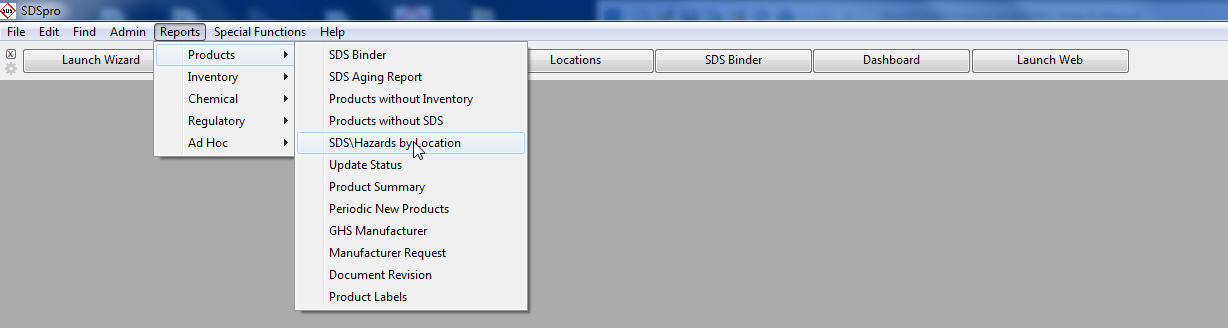
Select Reports, Product and Inventory tab, select the SDS Hazards by Location option.
Select the Location to search.
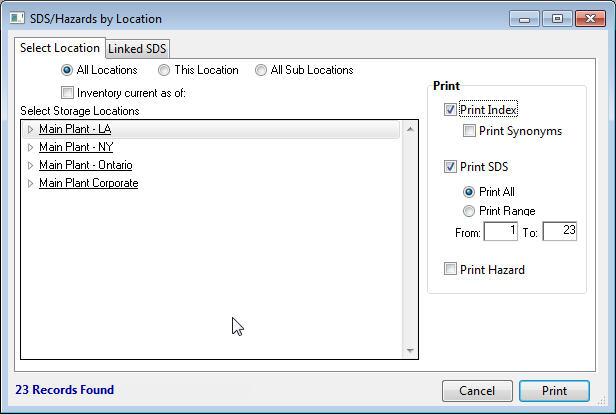
A. Choose All Locations to run the report on all locations.
B. Choose This Location to run the report on only the highlighted location.
C. Choose All Sub Locations to run the report at the highlighted location and all its child or sub locations.
Select items to print (Index, Synonyms, SDS, and Hazard Summary).
Any combination of items may be printed at one time. If Synonyms is selected, an alternate index will be printed that contains all the Synonyms associated with each Product in addition to the normal Index listing the Product Name.
If desired, check the Inventory current as of check box and Enter date to indicate that only those records active at a certain date should be printed.
Click the Linked SDS tab to preview the SDS documents that were found for the selected Location(s).
Click Print to print the Index, Synonyms, SDS documents, or Hazard Summaries, as determined on the Select Location tab.